The introduction of shifts as a new agent selection option for call queues in the Microsoft Teams Admin Center is a long-awaited innovation that simplifies many processes. If your employees work in a call center, support, or other areas with call queues, you know how much effort is involved: Every change to the work schedule—whether it’s a day off, a postponement, or a shift change – had to be manually entered in the Admin Center. This was not only tedious, but also prone to errors, especially for part-time employees with changing working hours. The integration of the Microsoft Shifts app into Microsoft Teams telephony changes this fundamentally: Working hours are managed directly in the app – and the call queues respond automatically.
Jürg Hirschi, Consultant at TwinCap First explains the advantages of this innovation and provides valuable practical tips on the topic of the Microsoft Shift app for Microsoft Teams telephony.
What is special about this integration?
The real innovation lies not in the Shifts app itself, but in its connection to Microsoft Teams telephony. Previously, adjustments to working hours or availability had to be made directly in the Admin Center. Today, this is done automatically via the shifts app – flexibly, efficiently, and securely.
The advantages at a glance:
Simplicity and flexibility: Work schedules are created and managed directly in the intuitive Shift app. Team leaders can change shifts themselves—without admin rights and without access to the Teams Admin Center.
Simplified configuration: The shift only needs to be entered once as an agent group in the Admin Center. After that, all changes are made automatically via the Shift app. Your call queues remain lean, clear, and up to date.
Dynamic adjustment: The call queue adapts to the shift schedules. Anyone who is not entered in the schedule is automatically excluded from call distribution. This ensures that calls are only forwarded to employees who are actually available.
Three scenarios that demonstrate the added value of the innovation
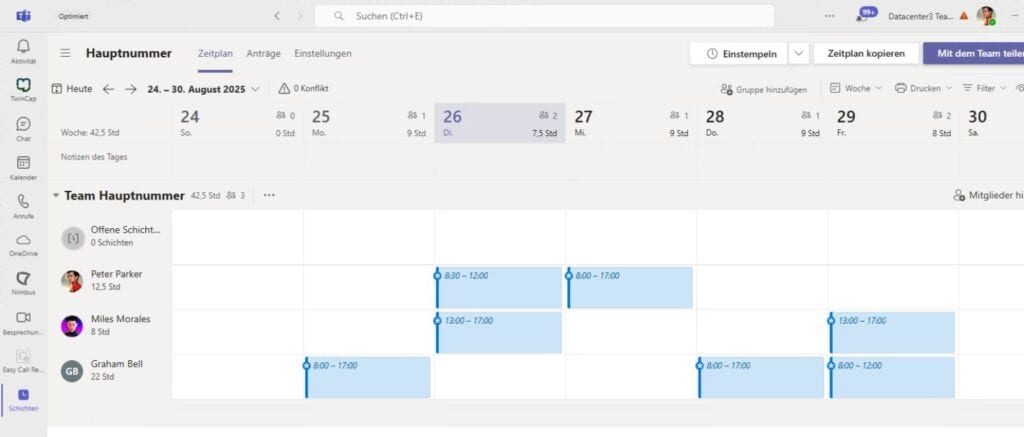
Work planning directly in the Shift app: You create your weekly schedule and immediately see who is available when and who is available for call distribution. You can flexibly take into account part-time employees with different working hours—and adjustments can be made quickly at any time.
The work schedule in the Microsoft Teams Shift app
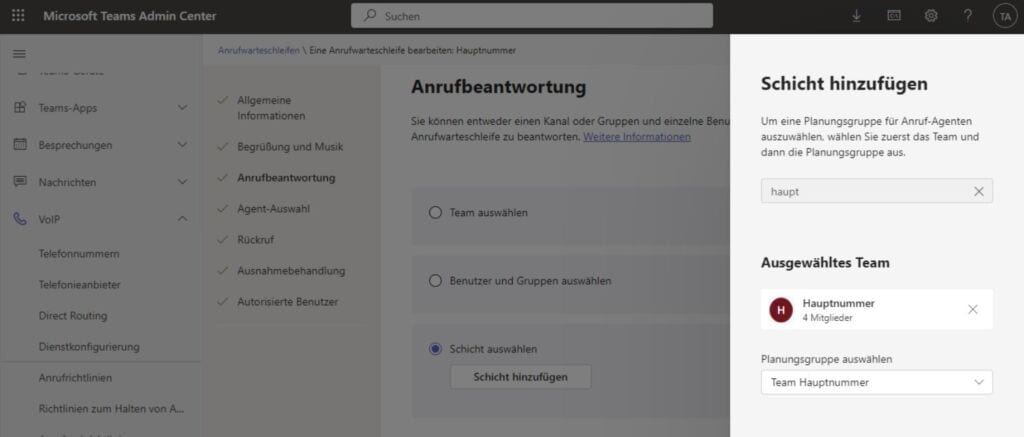
Easy configuration in the Admin Center for adding shifts: When setting up the call queue, you no longer have to add each individual user. Instead, simply select the shift—and you’re done.
Add shifts instead of individual user teams to a call queue
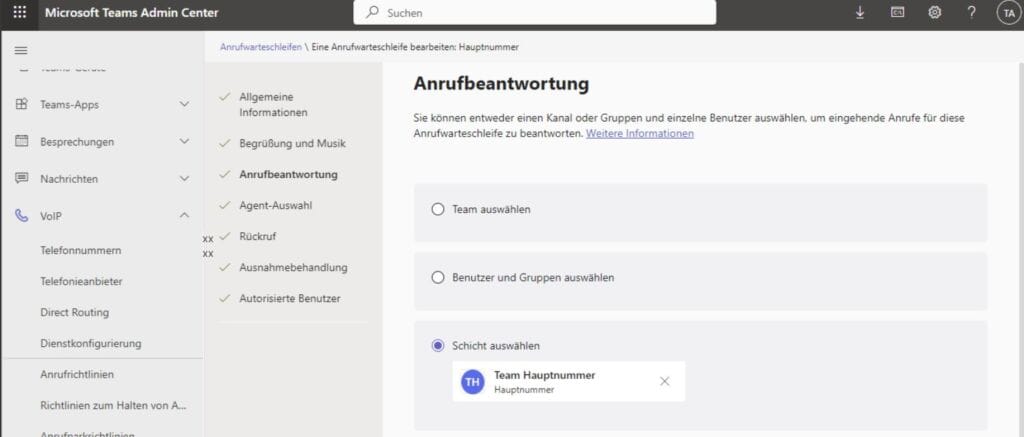
Setup complete, ready to use: Once you have completed the one-time setup, the process is complete and everything runs automatically from then on. The Admin Center now shows that agents are managed via the shifts app. New employees? Vacation? Changes? This happens directly in the Shifts app and has an immediate effect on call distribution.
Insight into the Microsoft Teams Admin Center – shifts can now be selected when answering calls
Shifts as an agent selection option: Why is this so important?
The introduction of shifts as a new agent selection option for call queues in the Microsoft Teams Admin Center greatly simplifies working with the Shifts app.
In practice, the integration means:
Less administrative work for IT teams
More responsibility for team leaders, who can manage schedules themselves
Efficient call distribution, because only employees who are actually available are taken into account
Fewer sources of error, as manual updates in the Admin Center are no longer necessary
The result: a telephone system that finally adapts dynamically to the reality of your shift planning—and not the other way around.
Conclusion: A big step forward for Teams telephony
The integration of the Microsoft Shifts app and Microsoft Teams telephony is a real milestone. Instead of static settings in the Admin Center, there is now a smart, dynamic solution that both reduces effort and improves the customer experience. Your team saves time, your IT department saves stress, and your calls reliably reach the right people. A clear game changer for all companies using Microsoft Teams telephony.
Share this post
Stay up to date.
Subscribe to our blog and never miss a post again. We will not spam you, but only inform you about new posts.
You might also be interested in these articles
Microsoft 365: EWS to Be Phased Out Starting in October 2026 – What Admins Need to Know Now
Modern cloud security requires constant adaptation. To keep interfaces future-proof, high-performing, and resilient against attacks, Microsoft is phasing out outdated protocols. Specifically, this affects ...
Security in SMEs: Why Perfectionism Is the Enemy of Good
The digital landscape is changing rapidly, and Swiss companies face enormous challenges. Storing data exclusively within the country or maintaining complete control over every ...
Book a Microsoft Teams meeting appointment with Christoph Schoch. After booking, you will receive an appointment invitation. There you will find a link for the Teams meeting. Of course you can also send us an e-mail or call us directly.