Microsoft Teams has long been more than just a collaboration tool. With the right add-ons, it becomes a powerful communication hub—for businesses of all sizes. TwinCap First offers a range of products for this purpose. Two of the solutions appear similar at first glance, but are fundamentally different: Easy Call Report and Easy Calling. Both extend Teams telephony—but with very different focuses. In this blog post, we take a closer look at both add-ons for professional call management.
Easy Call Report – your call reporting for call queues
With Easy Call Report, you can now see not only missed calls, but also all incoming calls from your Microsoft Teams call queues. This closes a crucial gap that Microsoft itself has left open until now.
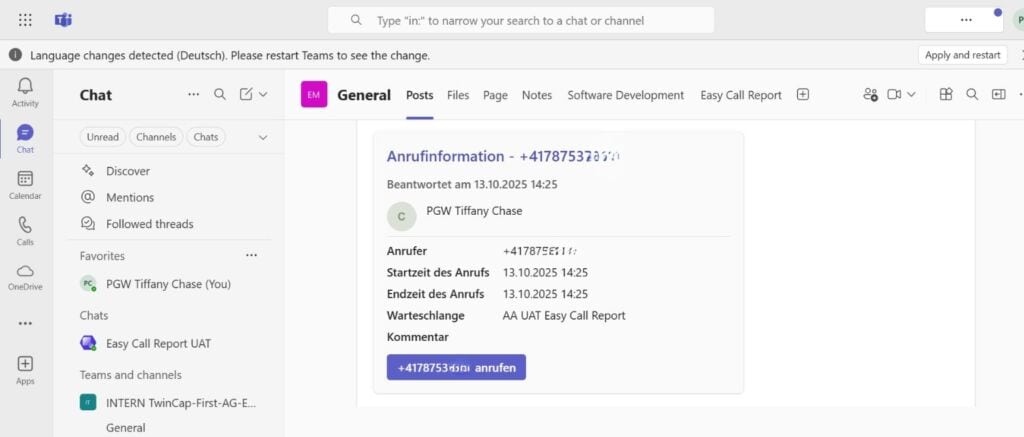
All calls, whether answered or missed, are clearly displayed in the dashboard. The adaptive card in the Teams channel contains all the important information: who called, when the call was made, and who answered the call.
The adaptive cards in Easy Call Report show details of missed and answered calls
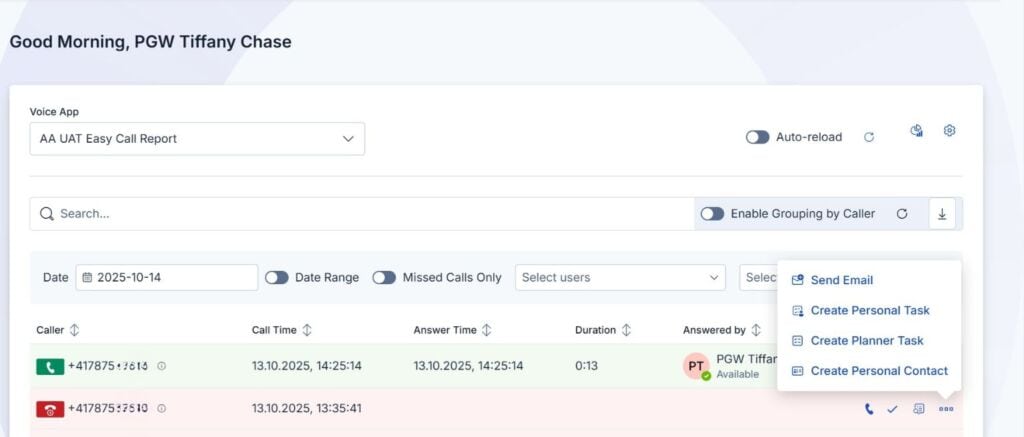
One click is all it takes to respond immediately – e.g., to initiate a callback, send an email, or save contact details (some of the features are only available in the Pro version).
The advantages of Easy Call Report at a glance:
Reporting for all calls in call queues (time-delayed)
Adaptive cards directly in the Teams channel
Call history tab for a quick overview
Easy setup via the Easy Platform Portal
Integration of Entra ID, Search.ch, and Easy Lookup for caller recognition
This finally gives your team full transparency over the flow of communication – and allows them to act immediately instead of reacting after the fact.
The dashboard in Easy Call Report shows all missed and answered calls in the call queue
Easy Call Report receives call recordings with a delay that depends on Microsoft. Does your company need real-time call information? Then Easy Calling is the solution.
Easy Calling – the compact contact center for Microsoft Teams
Easy Calling is the solution for anyone who wants to operate their hotline or service center directly in Teams. While Easy Call Report provides data, Easy Calling ensures active control in real time – with a live dashboard that displays all incoming, ongoing, and missed calls.
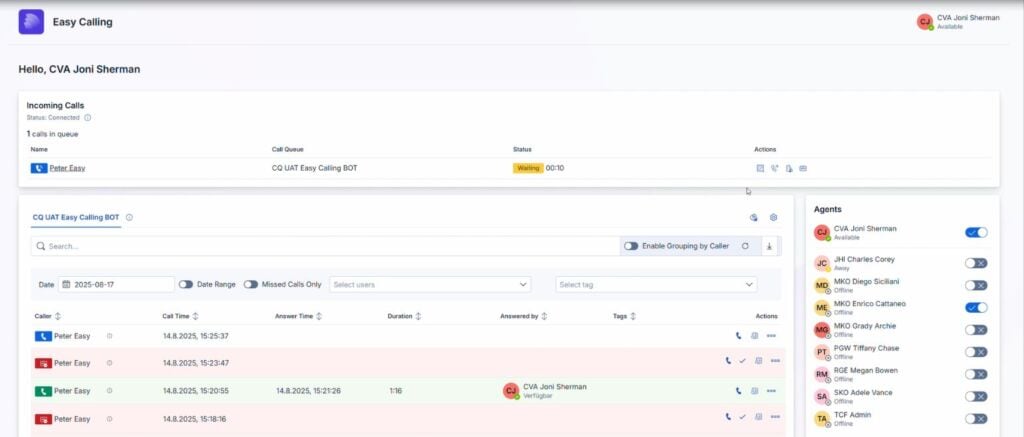
Your agents can flexibly opt in or out of queues. You can see who is active, how many calls are waiting, and which calls are currently in progress at any time.
Dashboard with live monitoring in Easy Calling
This makes Easy Calling the ideal solution for support, sales, or service teams looking for transparency and efficiency in a compact contact center.
Top features of Easy Calling:
Live dashboard with ongoing, waiting, and missed calls
6 months of call history with filter and export function
Agent management with opt-in/opt-out
Configuration center for administrators and supervisors
Integrated into Microsoft Teams or usable as a web app
Voicemail and real-time notifications
With Easy Calling, your Teams system becomes a professional contact center – simple, flexible, and Swiss Made.
Conclusion: Two add-ons for call management, one goal – more transparency and control in Microsoft Teams
Whether you want to analyze or actively manage calls, TwinCap First has the right solution:
Easy Call Report provides clear evaluations of your call queues
Easy Calling offers a compact, user-friendly contact center in Teams
Both add-ons are part of the Easy platform – with a central configuration portal, uniform design, and easy handling.
Try both solutions free for 30 days and experience how easy professional call management in Microsoft Teams can be:
Subscribe to our blog and never miss a post again. We will not spam you, but only inform you about new posts.
You might also be interested in these articles
Microsoft 365: EWS to Be Phased Out Starting in October 2026 – What Admins Need to Know Now
Modern cloud security requires constant adaptation. To keep interfaces future-proof, high-performing, and resilient against attacks, Microsoft is phasing out outdated protocols. Specifically, this affects ...
Security in SMEs: Why Perfectionism Is the Enemy of Good
The digital landscape is changing rapidly, and Swiss companies face enormous challenges. Storing data exclusively within the country or maintaining complete control over every ...
Book a Microsoft Teams meeting appointment with Christoph Schoch. After booking, you will receive an appointment invitation. There you will find a link for the Teams meeting. Of course you can also send us an e-mail or call us directly.