In a working world where information flows constantly and meetings, chats, and files take place simultaneously, it is becoming increasingly difficult to keep track of everything. This is exactly where Microsoft Copilot comes in: the AI function transforms Microsoft Teams from a pure collaboration tool into a smart assistant. Instead of spending time searching, following up, or laboriously structuring information, Copilot instantly delivers the right information, automatically prepares content, and assists with the next decision. This not only reduces the workload for individuals, but also increases efficiency across the entire team. Work more productively with Microsoft Teams—we’ll show you how!
Sarath Kochuparambil is a Junior Cloud Supporter at TwinCap First AG. In this blog post, he shows you how you can increase your productivity with Microsoft Teams Copilot.
Microsoft Teams Copilot in action: Practical use cases from everyday work
Whether it’s short chat replies, preparing for meetings, or quickly finding information, Copilot provides support in numerous everyday situations directly in Microsoft Teams. The following examples show how versatile the AI assistant can be and what added value it brings to everyday work.
Meeting summaries with Copilot: AI delivers decisions and to-dos
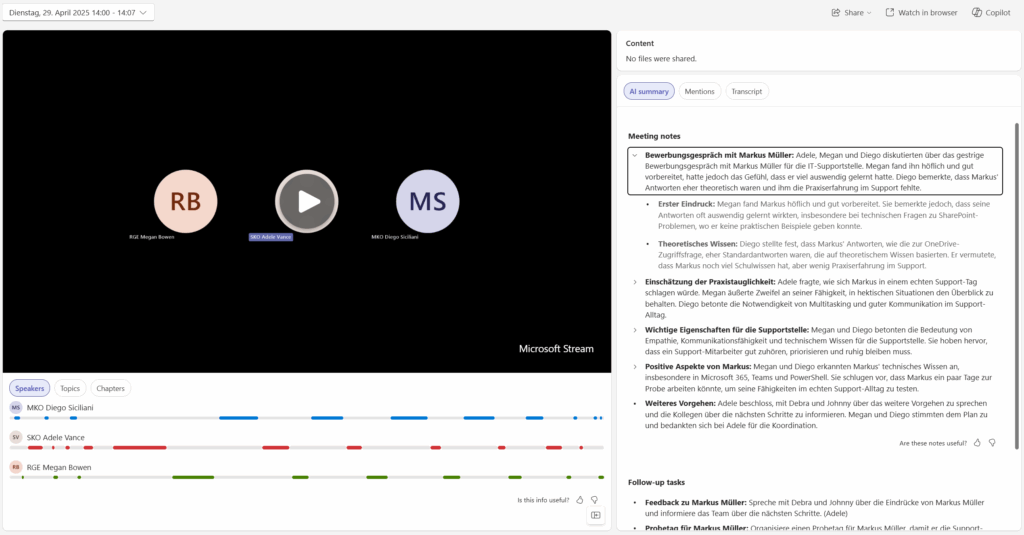
Copilot automatically generates an AI summary of a meeting – including decisions, open questions, and to-dos. In addition, further options such as “Speakers,” “Topics,” “Chapters,” “Transcript,” “Mentions,” as well as the “Meeting Notes” and “Follow-up Tasks” included in the AI summary are available. These options are easy to click and provide additional information about the meeting. This way, you not only get a summary but also quick navigation to all relevant details.
Meeting summaries with Microsoft Copilot
Efficient and stylish responses in Teams chats thanks to Microsoft Copilot
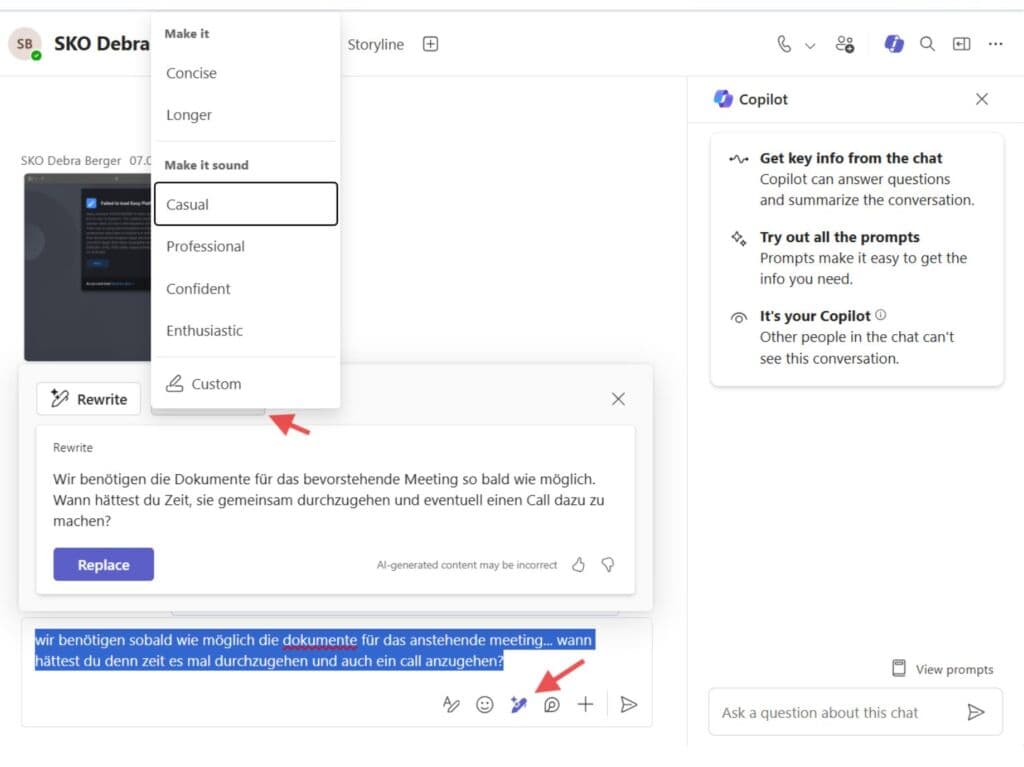
During longer discussions, Copilot suggests short reply options directly in the chat. The screenshot shows that the suggestions are tailored to the conversation – professional, but editable. Particularly helpful: you can also write your own text and ask Copilot to correct it, improve the style, or suggest more appropriate wording. This quickly produces a response that is not only correct, but also fits the desired tone of the chat.
Respond efficiently and stylishly in chat – thanks to Copilot in Microsoft Teams
Find information faster: Copilot searches Microsoft Teams for you
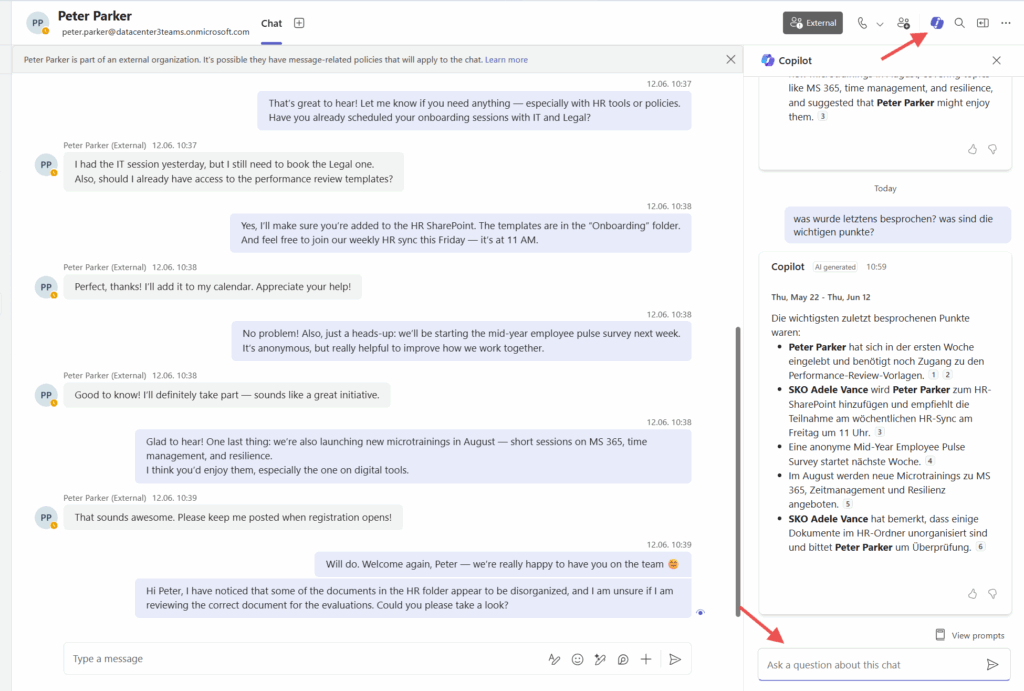
In the example below, Copilot was asked what had been discussed recently and what the most important points were. Instead of scrolling, Copilot delivers the relevant passages directly in the chat window. You can clearly see how quotes from older messages are taken and presented in context.
Find information faster: Copilot searches Microsoft Teams for you
Planning & organization with Microsoft Copilot: Meetings and topics at a glance
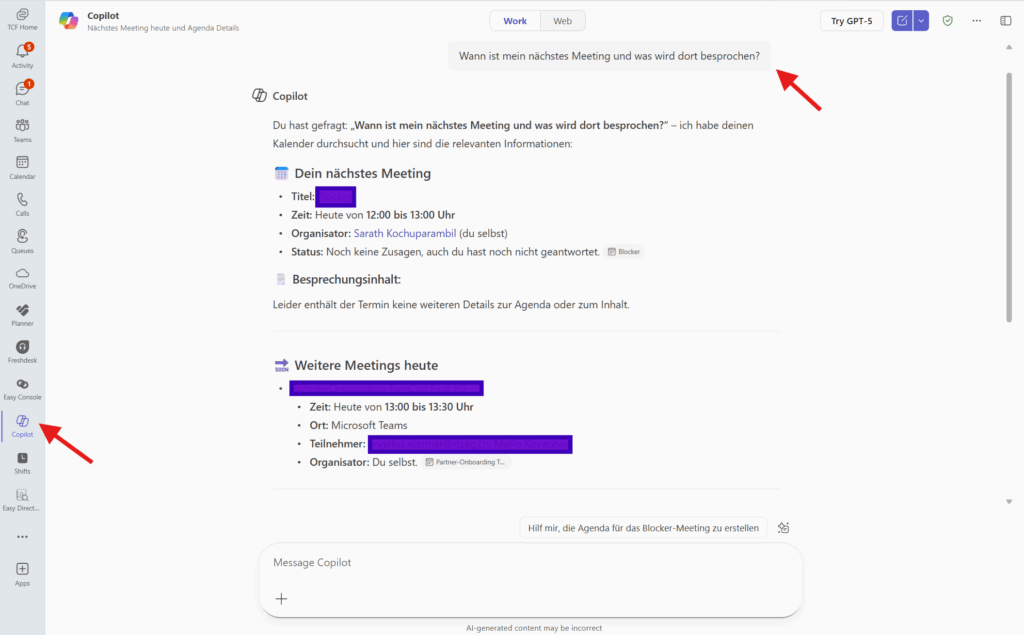
The screenshot shows how Copilot in Teams answers the question “When is my next meeting and what topics are on the agenda?” Copilot not only displays the date and time, but also lists the planned topics. This saves time because there is no need to search the calendar. In addition, you can ask Copilot about specific meetings or calls – for example, “Show me the next call with customer XY” or “What topics were discussed in last week’s weekly team meeting?”. This makes Copilot a practical navigator for your everyday meetings.
Planning and organizing meetings with Microsoft Copilot in Teams
The key benefits of Microsoft Teams Copilot for businesses
It’s not just individual employees who benefit—companies as a whole also gain from using Copilot. That’s because AI creates clarity and transparency and saves valuable resources. This is particularly evident in three key advantages:
Time savings thanks to less follow-up work
Transparency for all team members
Efficiency through clear answers and to-do lists
Practical tips: How to use Copilot effectively
To get the most out of Copilot, it’s worth following a few simple rules when using it. This will ensure that the results are accurate and that your team benefits from them in the best possible way:
Make sure you have the correct permissions, as Copilot can only access shared data
Always check sensitive information critically—Copilot supports but does not replace common sense
Conclusion: Microsoft Copilot as a game changer for productivity and collaboration
Microsoft 365 Copilot makes Teams much more than just a chat or meeting tool. It becomes an intelligent assistant that connects data, structures conversations, and prepares decisions. Consistent use of Copilot not only increases efficiency but also brings more clarity to everyday work. Companies benefit twice over: from faster processes and from teams that can focus on content rather than administration. Copilot is therefore a real game changer for modern collaboration.
Would you also like to work more productively in Microsoft Teams?
Share this post
Stay up to date.
Subscribe to our blog and never miss a post again. We will not spam you, but only inform you about new posts.
You might also be interested in these articles
Microsoft 365: EWS to Be Phased Out Starting in October 2026 – What Admins Need to Know Now
Modern cloud security requires constant adaptation. To keep interfaces future-proof, high-performing, and resilient against attacks, Microsoft is phasing out outdated protocols. Specifically, this affects ...
Security in SMEs: Why Perfectionism Is the Enemy of Good
The digital landscape is changing rapidly, and Swiss companies face enormous challenges. Storing data exclusively within the country or maintaining complete control over every ...
Book a Microsoft Teams meeting appointment with Christoph Schoch. After booking, you will receive an appointment invitation. There you will find a link for the Teams meeting. Of course you can also send us an e-mail or call us directly.