
Security in SMEs: Why Perfectionism Is the Enemy of Good
The digital landscape is changing rapidly, and Swiss companies face enormous challenges. Storing data exclusively within the country or maintaining complete control over every ...

Companies invest heavily in modern communication. Microsoft Teams is often the central tool in this effort. It connects employees, streamlines meetings, and creates a shared platform for collaboration. However, as soon as customer calls need to be professionally managed, it quickly becomes clear that efficient customer support with Microsoft Teams requires more than just standard telephony.
After all, good customer service isn’t just about being available. It arises when calls are reliably received, quickly routed to the right team, properly documented, and remain traceable for everyone involved. When exactly that is missing, not only do processes suffer, but so do the customer experience and team performance.
Easy Calling addresses this exact need. The solution extends Microsoft Teams so that companies can make their call handling significantly more structured, transparent, and efficient. This is particularly valuable in environments where customer inquiries, service calls, support cases, or sales calls are handled on a daily basis.
In many companies, the challenge starts quite simply. A central number is managed by several people. Calls come in simultaneously. It’s not always clear who is currently available, who has taken a call, or whether a callback is still pending. On top of that, there are voicemails, emails, paper notes, and follow-up questions in chat.
What seems small when viewed individually adds up significantly over the course of the day. Employees waste time. Team leads have to piece together information. Customers experience wait times, having to explain things twice, or delayed responses.
Modern, efficient customer support with Microsoft Teams telephony must therefore do more than just answer calls. It must make processes visible, clarify responsibilities, and simplify follow-up. Only then does telephony become a true service process.
One of the biggest levers in customer service is transparency. Those who see what’s happening can respond better. Easy Calling provides exactly this real-time transparency.
Team leads and employees can see at a glance which calls are active, who is waiting, who is available, and where action is needed. This allows call spikes to be identified more quickly and better managed. At the same time, the distribution of calls within the team becomes more transparent.
This visibility isn’t just relevant for managers. It also significantly improves the daily workflow for employees. They no longer have to wonder whether someone has already responded or if a request is still pending. This reduces coordination efforts and creates more certainty in handling inquiries.
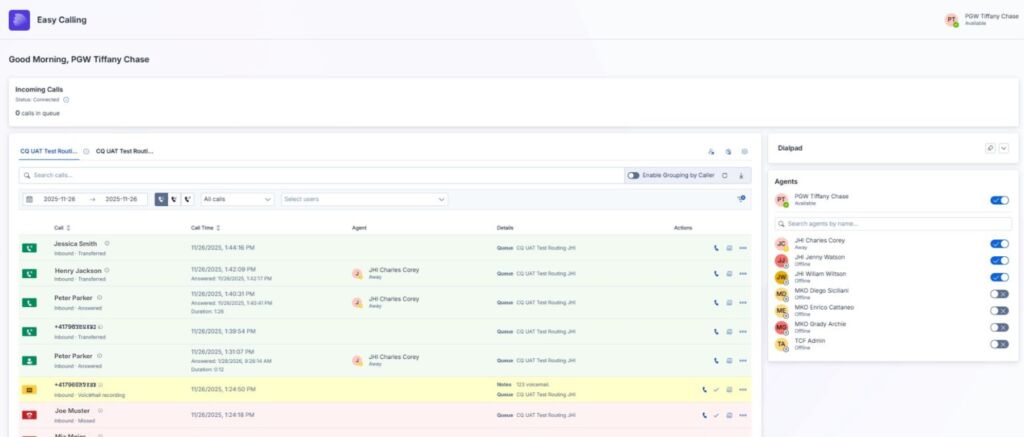
For companies, missed calls are costly. They cost trust, time, and, in the worst case, revenue. This is precisely why a solution that specifically routes calls, rather than leaving it to chance, is worthwhile.
Easy Calling supports intelligent call distribution based on availability and responsibility. Additionally, call forwarding, voicemail, queues, or on-call solutions can be flexibly configured. This is particularly valuable for companies with part-time models, multiple teams, or fluctuating availability.
In principle, simple call forwarding to other call queues is also possible in the standard version of Microsoft Teams. In practice, however, the process often remains fragmented. Context is lost, escalations can only be handled to a limited extent, and tracking is spread across multiple systems. This is exactly where Easy Calling comes in. Calls can be forwarded specifically to separate call queues (for escalations, etc.) while remaining fully integrated into the overall process.
Easy Calling also provides greater flexibility outside of traditional office hours. Calls can be automatically forwarded to other queues, voicemail boxes, or even multiple external phone numbers. This enables efficient customer service with Microsoft Teams that adapts to real-world workflows and isn’t tied to rigid business hours.
A common cause of productivity loss in customer service is the switching between different platforms. A call in Microsoft Teams, a note in Notepad, a callback in Planner, an email in Outlook, and a history in CRM. Every switch costs time and concentration.
Easy Calling brings these steps closer together. Notes are taken directly during the call. Tasks can be created immediately after the call. Emails can be sent directly from the context of the conversation. Call histories and voicemails remain stored in a traceable manner.
This not only saves valuable time. It also ensures that fewer things are forgotten. Callbacks no longer get lost on scraps of paper. Information stays with the case. And new team members can understand what has already happened more quickly.
For managers, customer service is often difficult to manage when data is missing or only available with a delay. Then management becomes reactive. Problems only become visible when customers are already dissatisfied or the team is under pressure.
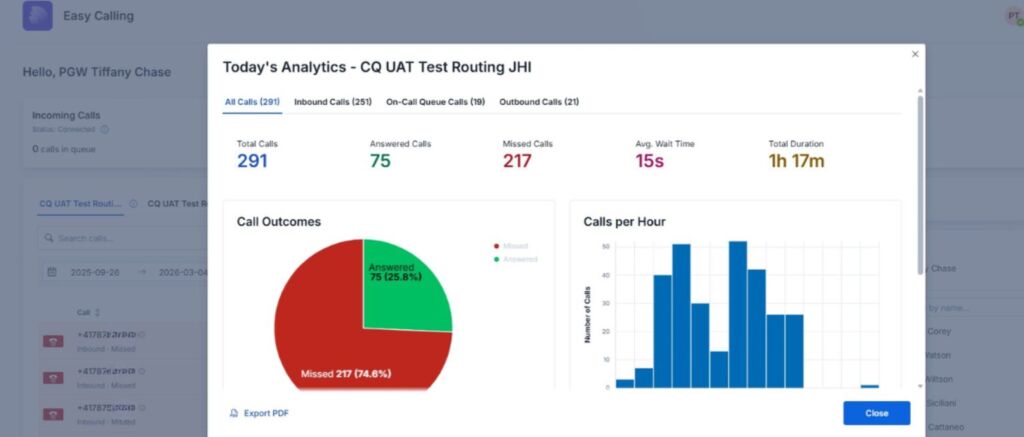
Easy Calling helps break this reactive cycle. Visual analytics show call patterns, peak times, and team performance. Missed calls, wait times, or queue issues become visible more quickly. At the same time, settings such as greetings, call forwarding, or availability can be adjusted directly.
The major advantage is that team leads don’t need IT support first to make operational improvements. Many adjustments can be implemented directly where they’re needed. This shortens response times and makes customer service more agile.
The larger a team becomes, the more important structure becomes. New employees need to be trained more quickly. Responsibilities should be clear. Duplication of effort and downtime should be avoided.
Easy Calling supports exactly this kind of scaling. New employees can view the call history, better understand previous contacts, and log in or out of specific queues depending on their role. Managers can see how calls are distributed and where bottlenecks occur in the workflow.
This makes the solution particularly suitable for companies that want to professionalize their customer service or keep pace with growth without unnecessarily increasing complexity.
The economic impact rarely stems from a single major cost-saving opportunity. It arises from many small improvements that take effect every day. Fewer missed calls. Faster follow-up. Clearer responsibilities. Less time spent searching. Better team utilization. Shorter onboarding for new employees.
Added to this is a qualitative effect that is often underestimated: customers perceive the service as more coordinated and reliable. They have to repeat themselves less often, receive feedback faster, and are more likely to speak with prepared representatives. This strengthens trust and professionalism.
If companies are already using Microsoft Teams telephony, Easy Calling is therefore a logical next step. The solution builds on the existing work environment and enhances it where real operational benefits arise.
Efficient customer support with Microsoft Teams requires more than just telephony. It requires visibility, structure, and simple workflows. Easy Calling creates exactly this connection.
The solution helps companies distribute calls more effectively, make information centrally available, reliably organize callbacks, and manage work teams in real time. This reduces the workload on employees, empowers managers, and improves the customer experience.
If you’re already using Microsoft Teams and want to take your customer service to the next level, Easy Calling offers a solution that doesn’t add complexity but noticeably simplifies day-to-day operations.
Try Easy Calling free for 30 days or schedule an initial consultation.
Subscribe to our blog and never miss a post again. We will not spam you, but only inform you about new posts.
The digital landscape is changing rapidly, and Swiss companies face enormous challenges. Storing data exclusively within the country or maintaining complete control over every ...
Anyone who makes calls using Microsoft Teams is probably familiar with this situation: The phone rings, but instead of a name, only a phone ...
A few weeks ago, we’ve been discussing an uncomfortable truth: Purchasing a Microsoft license is by no means a “Modern Work” strategy. A license ...
Artificial intelligence is shaping today’s economy like almost no other technology, which is why nearly every executive suite feels the urgency to address this ...
Book a Microsoft Teams meeting appointment with Christoph Schoch. After booking, you will receive an appointment invitation. There you will find a link for the Teams meeting. Of course you can also send us an e-mail or call us directly.
If you have any questions, please use our Help Centre and/or open a ticket for your request.