The world of work is changing rapidly – and artificial intelligence has long since become part of everyday office life. With Microsoft Copilot Chat, Microsoft is now bringing an intelligent companion directly into familiar Microsoft 365 apps such as Word, Excel, PowerPoint, Outlook, and OneNote.
What makes it special is that Copilot is seamlessly integrated, understands the context of your work, and supports you exactly when you need it. Whether you’re writing texts, creating analyses, or refining presentations, Copilot Chat thinks along with you, saves time, and makes your digital workplace more productive than ever before.
Sarath Kochuparambil is a Junior Cloud Supporter at TwinCap First AG. In this blog post, he shows how Copilot Chat makes Microsoft 365 even smarter and makes your everyday work easier.
Microsoft Copilot Chat – your smart AI companion for everyday work
Microsoft is bringing Copilot Chat directly to Microsoft 365 apps – at no additional cost for anyone with a Microsoft 365 or Office 365 subscription. Whether you’re writing a document, analyzing a spreadsheet, or catching up on your emails, Copilot is now right where you need it. It helps you formulate texts, summarize content, develop ideas, and complete routine tasks with a single click.
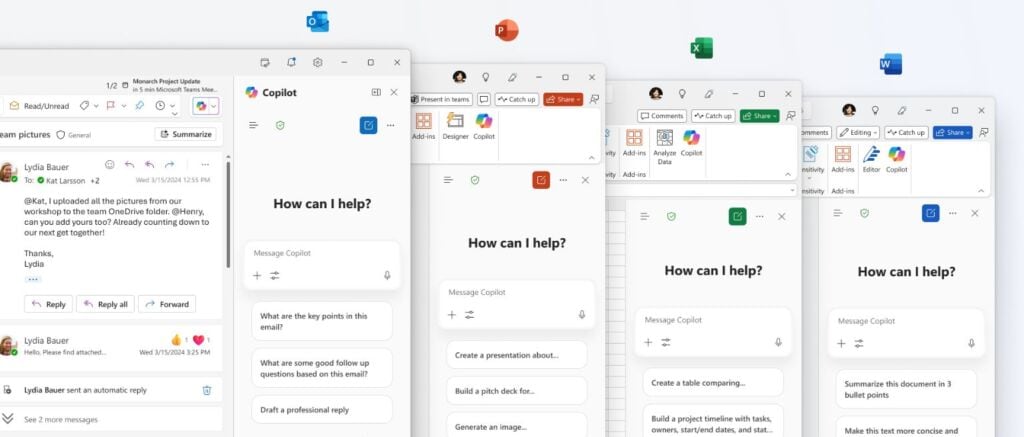
Microsoft Copilot Chat is integrated directly into the apps you use every day.
How Microsoft Copilot Chat supports you in your everyday life
Microsoft Copilot Chat is an intelligent AI assistant. It automatically recognizes the content you are currently working on and provides tailored suggestions, answers, or formatting. The assistant opens conveniently in a sidebar – right in the apps you use every day, such as Word, Excel, PowerPoint, Outlook, or OneNote.
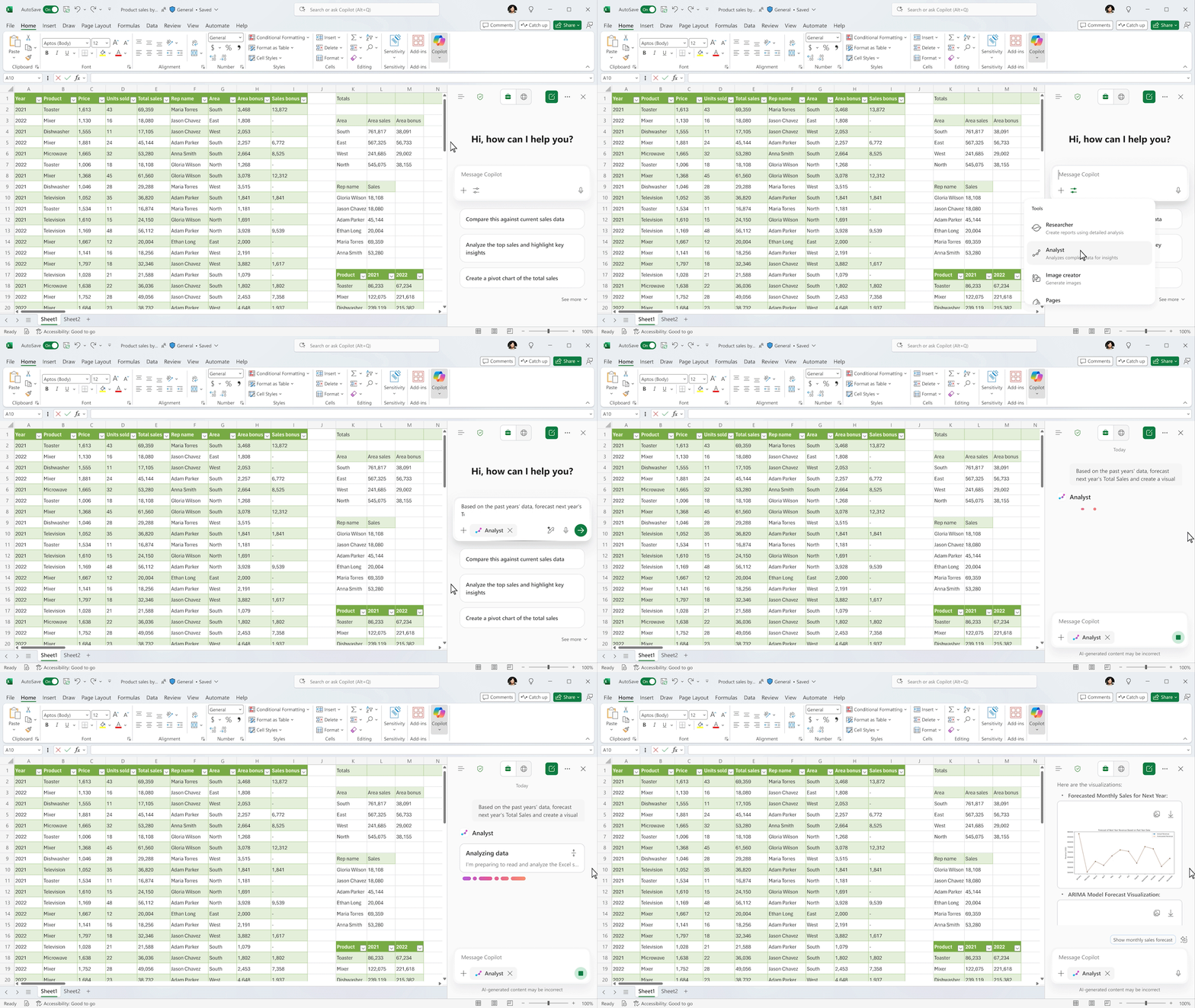
Microsoft Copilot Chats in Excel
Examples from everyday life:
Outlook: Summarize long email threads or have reply suggestions written for you
Word: Ask Copilot to stylistically revise your texts or automatically create an executive summary
Excel: Create a chart from your data with a single click – no formula knowledge required
PowerPoint: Generate questions your audience might ask or update your slides with new content
OneNote: Structure confusing notes or summarize meeting minutes concisely
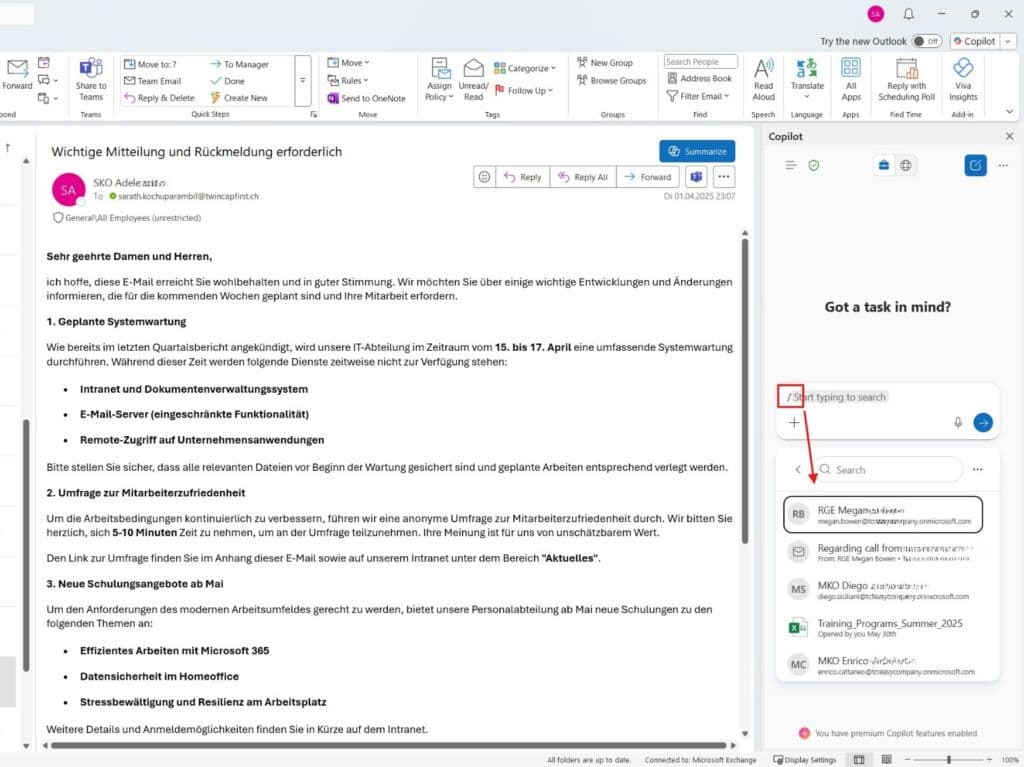
A handy extra: With the command “/”, you can search directly for files or insert content from recently used documents into the chat. The image shows the first or matching documents that appear when you use the command. The command works not only in Outlook, but also in other applications such as Word, Excel, and others. This allows you to work seamlessly without changing context.
Work smarter with commands in Microsoft Copilot Chat
Free for many – with upgrade options
Copilot Chat is now available free of charge in most Microsoft 365 and Office 365 subscriptions. If you want to use additional AI features such as agents, Copilot Studio, or AI search across all files, you can upgrade to the paid Microsoft 365 Copilot add-on.
Licensed users also benefit from:
Faster response times
GPT-5 optimization
Extensions such as Researcher or Analyst Agent in Excel
Microsoft Copilot Chats: Security remains a top priority
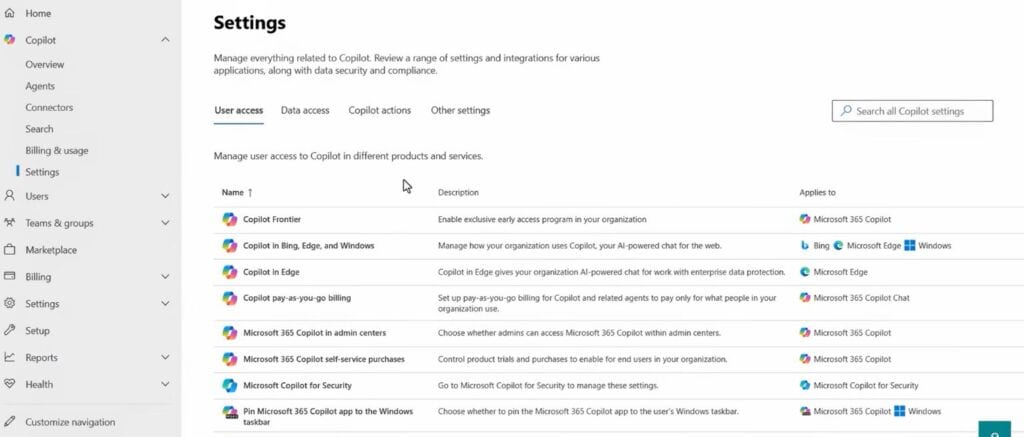
As always, data protection and security are central to Microsoft. Microsoft Copilot Chat is based on Microsoft Purview and the Copilot Control System (CCS) – two components that ensure that sensitive information remains protected and only authorized persons have access to data. This gives companies full control and transparency over the use of AI in their daily work.
Microsoft Copilot Chat – Sensitive data is protected in Microsoft Copilot Chats
Work smarter with AI – with Copilot Chat directly in Microsoft 365
Copilot Chat makes Microsoft 365 more personal, intuitive, and simply more useful.
Finally, you can work with your AI right where you are every day: in Word, Excel, PowerPoint, Outlook, and OneNote. A real step towards a working day that feels smarter, easier, and more human.
Copilot Chat makes Microsoft 365 more personal, intuitive, and productive. Finally, you can work with your AI right where you are every day – in Word, Excel, PowerPoint, Outlook, and OneNote. Routine tasks are done in no time, analyses are faster, and creative work is more fun again.
Copilot Chat is more than a tool. It’s an intelligent partner that really makes your everyday work easier and gives you time for what’s important.
Would you also like to work smarter in Microsoft 365? Book an introductory workshop (duration approx. 1-2 hours, charged according to time spent) with Sarath Kochuparambil now. Feel free to contact us if you are interested.
Share this post
Stay up to date.
Subscribe to our blog and never miss a post again. We will not spam you, but only inform you about new posts.
You might also be interested in these articles
Microsoft 365: EWS to Be Phased Out Starting in October 2026 – What Admins Need to Know Now
Modern cloud security requires constant adaptation. To keep interfaces future-proof, high-performing, and resilient against attacks, Microsoft is phasing out outdated protocols. Specifically, this affects ...
Security in SMEs: Why Perfectionism Is the Enemy of Good
The digital landscape is changing rapidly, and Swiss companies face enormous challenges. Storing data exclusively within the country or maintaining complete control over every ...
Book a Microsoft Teams meeting appointment with Christoph Schoch. After booking, you will receive an appointment invitation. There you will find a link for the Teams meeting. Of course you can also send us an e-mail or call us directly.