
Security in SMEs: Why Perfectionism Is the Enemy of Good
The digital landscape is changing rapidly, and Swiss companies face enormous challenges. Storing data exclusively within the country or maintaining complete control over every ...
With Easy Calling, TwinCap First is launching a powerful contact center solution directly in Microsoft Teams. No complicated systems, no expensive additional platforms—everything runs where your team already works. Whether it’s incoming calls, missed calls, or organizing your team, Easy Calling ensures clarity, efficiency, and smart communication.
The solution is fully integrated into Microsoft Teams, intuitive to use, and ready to go. No additional login, no lengthy training. Just get started and immediately benefit from all the features.
The strength of Easy Calling lies in its live overview:
This creates transparency and enables a quick response.
With Easy Calling, you have your call management under control. The solution combines classic telephony with modern intelligence:
This turns your Teams client into a control center for calls – efficient, clear, and professional.
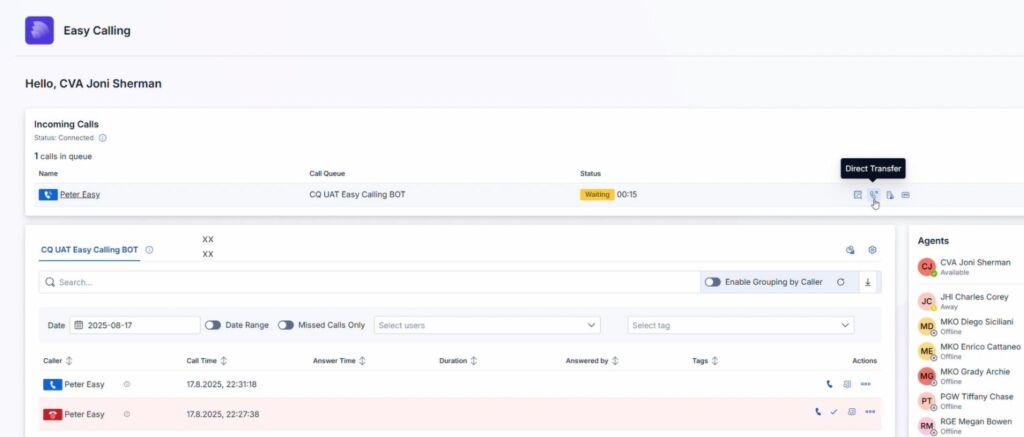
Never miss a call again. Easy Calling delivers notifications right where you work: in Microsoft Teams:
This keeps your team responsive—without emails. And without having to switch tools.
Easy Calling also elegantly integrates voicemails into teams:
This allows you to stay on top of things even outside office hours.
Easy Calling adapts to your team – worldwide:
This allows international teams to work together without any obstacles.
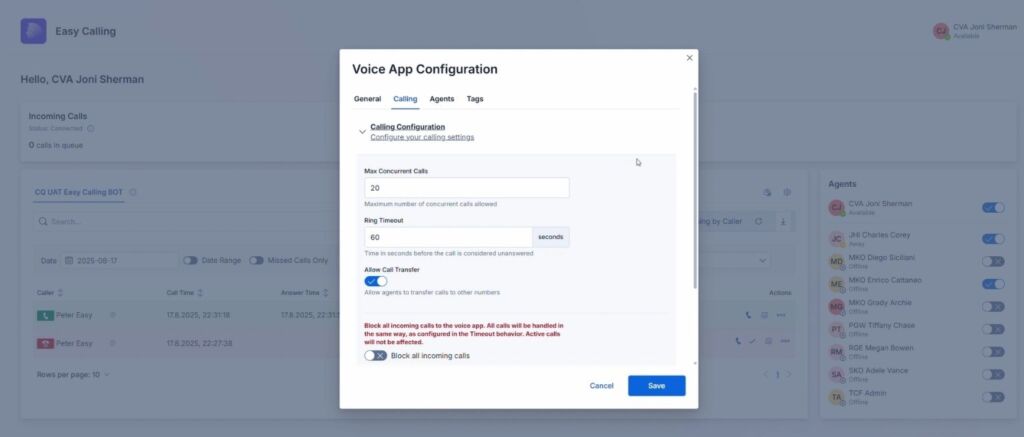
Admins and team leaders can customize Easy Calling—it’s easy and straightforward in the settings:
Easy Calling meets high security standards, ensuring your company remains legally compliant and protected:
Easy Calling is natively integrated into Microsoft Teams. It also features smart interfaces:
Easy Calling, the contact center for Microsoft Teams, is particularly suitable for small and medium-sized teams that want to manage their calls professionally. Companies that already use Microsoft Teams also benefit from seamless integration and additional features. For support and sales teams, the solution offers the flexibility and speed needed to handle customer inquiries efficiently. At the same time, Easy Calling is ideal for IT departments looking for a solution that can be implemented quickly while meeting high security and compliance standards.
Easy Calling combines intelligent call management, smart notifications, secure voicemails, flexible configuration, and deep Teams integration—all in one streamlined interface.
You remain in control of calls, waiting customers, and your team at all times. Your employees work faster, more securely, and more efficiently. And you save on costly training or external systems. Easy Calling – compact. Fair. Swiss Made.
Subscribe to our blog and never miss a post again. We will not spam you, but only inform you about new posts.
The digital landscape is changing rapidly, and Swiss companies face enormous challenges. Storing data exclusively within the country or maintaining complete control over every ...
Anyone who makes calls using Microsoft Teams is probably familiar with this situation: The phone rings, but instead of a name, only a phone ...
A few weeks ago, we’ve been discussing an uncomfortable truth: Purchasing a Microsoft license is by no means a “Modern Work” strategy. A license ...
Artificial intelligence is shaping today’s economy like almost no other technology, which is why nearly every executive suite feels the urgency to address this ...
Book a Microsoft Teams meeting appointment with Christoph Schoch. After booking, you will receive an appointment invitation. There you will find a link for the Teams meeting. Of course you can also send us an e-mail or call us directly.
If you have any questions, please use our Help Centre and/or open a ticket for your request.