Phone calls are one of the most direct points of contact between companies and customers. Within seconds, it is decided whether trust is established or frustration gains the upper hand. This is precisely why it is crucial how incoming calls are monitored. Call queues help to manage calls in a structured manner. But setting up call queues alone is not enough. Without real-time monitoring, there is a risk of long waiting times, missed opportunities, and dissatisfied callers. Real-time monitoring is a major challenge, especially in Microsoft Teams. In this blog post, we’ll show you why monitoring call queues is so important and how real-time monitoring of call queues is also possible in Microsoft Teams.
What call queues can do—and where their limitations lie
Call queues are waiting lines for incoming calls. They ensure that callers are not left hanging, but are forwarded to available employees one after the other. Standard features such as welcome messages or music in the queue convey professionalism and provide information about the status.
But technology alone does not solve problems. The crucial question is: How are these queues monitored in practice? Only with real-time transparency can you ensure that customers are served in a timely manner and employees are not overloaded.
Why real-time monitoring is crucial
We will show you five reasons why real-time monitoring of call queues is so important:
1. Seconds determine customer satisfaction
Callers expect quick responses. Every additional minute in the queue increases the risk of them hanging up.
Real-time monitoring makes it clear as soon as waiting times increase. Companies can react immediately before frustration arises.
2. Full transparency for managers
How many calls are currently waiting? Which queue is overloaded? How many employees are logged in and actually available? Real-time monitoring answers these questions immediately. This allows bottlenecks to be identified and resolved in a timely manner.
3. Targeted distribution within the team
If you can see that individual employees are overloaded, you can redirect calls in a targeted manner. This keeps the workload balanced. This not only increases efficiency, but also motivation within the team. No one is left alone with the greatest pressure.
4. Prevent missed calls
Every missed call means a missed opportunity. Without monitoring, this often only becomes apparent later – when the customer is long gone. With real-time monitoring, you can immediately see when calls are being lost and take immediate countermeasures.
5. Basis for long-term improvements
Real-time data is not only important for the moment. It also provides the basis for strategic decisions. If you know when call peaks occur, how long the actual waiting times are, and which queues are overloaded, you can optimize processes in a targeted manner.
What happens without live monitoring of call queues?
Companies that do not monitor often struggle with the same problems:
Customers are left waiting in the queue for too long
Complaints pile up without the cause being clear
Employees feel overworked
Missed calls go undetected
Decisions are based on assumptions rather than data
The result: Dissatisfied customers, stressed employees, and lost business.
Monitoring call queues in Microsoft Teams is a particular challenge
In traditional telephone systems, real-time dashboards have long been standard. They show at a glance how many calls are coming in, how long the current wait time is, and which employees are available. Microsoft Teams, on the other hand, was primarily developed as a collaboration platform. Although telephony is integrated, the monitoring functions are very limited.
This makes monitoring call queues in Microsoft Teams a particular challenge. Real-time data is often unavailable or only available with a delay. Anyone who wants to know how many callers are currently waiting or how busy a queue is quickly reaches their limits. There is also no central overview: managers have to jump between different reports to get an idea of the situation. This costs time and makes quick decisions difficult.
In addition, the reporting structure is complex. Many evaluations can only be accessed retrospectively – too late for proactive control in day-to-day business. In practice, this means that team leaders have to improvise, export data manually, or use several tools in parallel to identify bottlenecks. Especially when call volumes are high, this makes it almost impossible to maintain an overview.
The solution? Live monitoring in Microsoft Teams with Easy Calling from TwinCap First
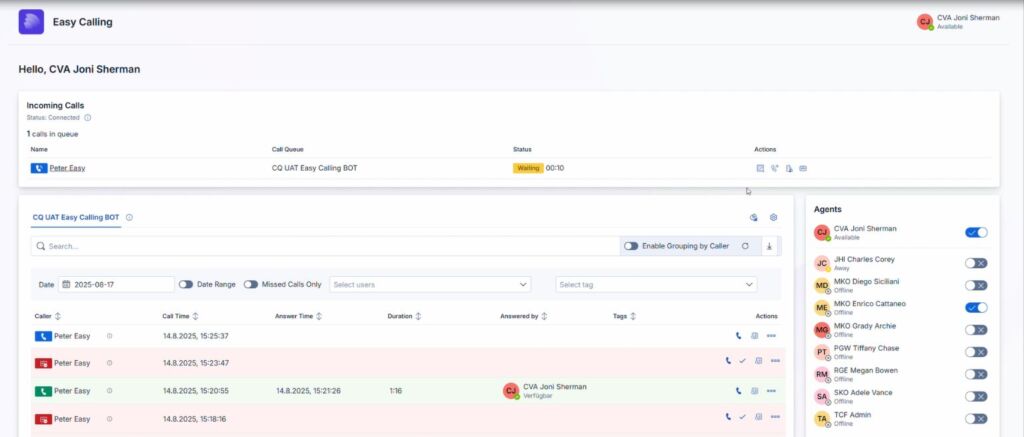
This is exactly where the add-on Easy Calling from TwinCap First comes in. It extends Microsoft Teams with the functions that are missing for professional call queue monitoring. Its strength lies in the live overview: all active calls are displayed in real time in the dashboard. Queues can be monitored precisely, so you can immediately see how many callers are waiting and which agents are available. This is complemented by detailed call analysis, which clearly displays key figures such as average call duration, calls per hour, and call results. At the same time, the status of each agent is immediately visible—whether available, busy, or offline. This creates transparency and enables quick responses.
Monitoring call queues in Microsoft Teams is easy thanks to Easy Calling
Easy Calling also gives you way more control over call management. Callers waiting in line get the best service thanks to the built-in queuing system. You can easily forward calls to specific employees, hold them in a queue, or even send them to outside numbers. The monitoring dashboard lets team leaders keep track of ongoing, waiting, and completed calls at any time. Practical quick actions round off the package: emails can be sent, notes taken, tasks created, or contacts saved directly from a call.
Easy Calling thus transforms the Teams client into a central hub for professional call management – efficient, clear, and, above all, in real time.
Conclusion: Real-time monitoring of call queues is essential – even in Microsoft Teams!
Monitoring call queues in real time is not a luxury, but a necessity.
It reduces waiting times.
It prevents missed calls.
It ensures a fair workload within the team.
It provides data for better decisions.
At a time when service quality determines success or failure, real-time monitoring is the key to satisfied customers and motivated employees. Easy Calling makes Microsoft Teams fit for purpose – for full transparency and professional call management.
Subscribe to our blog and never miss a post again. We will not spam you, but only inform you about new posts.
You might also be interested in these articles
Microsoft 365: EWS to Be Phased Out Starting in October 2026 – What Admins Need to Know Now
Modern cloud security requires constant adaptation. To keep interfaces future-proof, high-performing, and resilient against attacks, Microsoft is phasing out outdated protocols. Specifically, this affects ...
Security in SMEs: Why Perfectionism Is the Enemy of Good
The digital landscape is changing rapidly, and Swiss companies face enormous challenges. Storing data exclusively within the country or maintaining complete control over every ...
Book a Microsoft Teams meeting appointment with Christoph Schoch. After booking, you will receive an appointment invitation. There you will find a link for the Teams meeting. Of course you can also send us an e-mail or call us directly.