
Security in SMEs: Why Perfectionism Is the Enemy of Good
The digital landscape is changing rapidly, and Swiss companies face enormous challenges. Storing data exclusively within the country or maintaining complete control over every ...
The phone rings. Once. Twice. Three times. Then silence. The caller has hung up. For you, it may have been just a brief buzz in the background while you were in a meeting. For your company, it may have been the loss of a lucrative order. In a world where we have to fight hard for customer loyalty, availability is the hardest currency. Interested parties rarely call twice. If your company is unavailable, the next number will be dialed on Google. And that’s usually the number of your competitors. So do missed calls always mean lost sales?
We have to be realistic: No one is always available. Meetings, lunch breaks, and periods of concentration are part of everyday working life. So the problem isn’t that a call is missed. The problem is how we deal with it. In most companies, missed calls disappear into a black hole. They end up in individual call lists that no one else sees. They get lost on answering machines that aren’t checked until days later. That’s lost profit. It’s frustrating. And it’s completely unnecessary.
With Easy Calling from TwinCap First, we turn the tables. We transform the “black hole” into a gold mine. We show you how to rescue every lead with the Missed Call Queue – in real time.
Microsoft Teams is great for collaboration. But as a pure telephone system, it often reaches its limits – especially when it comes to missed calls and transparency within the team.
Imagine the following scenario: Your top salesperson is in a presentation. A potential new customer calls him. No one answers. The call ends up in the salesperson’s personal “missed” list. No one else on the team knows about it. The salesperson doesn’t come out of the meeting until three hours later. He sees the call, calls back – but the customer has long since signed elsewhere.
This is classic flying blind. First, there is a lack of overview and second, a lack of speed. This is exactly where Easy Calling comes in. At TwinCap First, we have developed a solution that adds precisely this missing layer to Microsoft Teams: Total transparency for the entire team.
Note: Easy Calling is based on call queues, i.e., telephone waiting loops. Easy Calling does not intercept personal numbers.
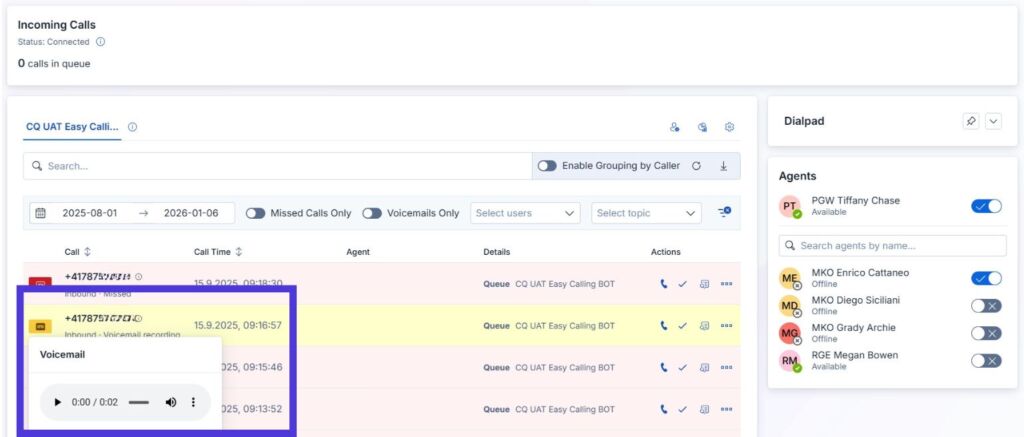
Easy Calling is not just an add-on. It’s your cockpit. We integrate a visual interface directly into Teams that gives you and your team back full control. The core of this solution is the central overview of all calls in a call queue.
Forget isolated lists. With Easy Calling, you can see what’s happening on your lines in real time. Whether it’s sales, support, or headquarters, the dashboard shows the pulse of your communication. And the best part is that it’s so intuitive that you don’t need any training to understand it.
“Real time” is not just a buzzword for us. When a phone rings, you as a user of the call queue see it on the dashboard. Immediately. If a call is missed, it appears in the list at the same moment.
There is no delay. For your team, this means responsiveness. All users of the call queue can now react immediately. You can call the customer back before they have even finished typing in the number of your competitor. This is the “wow effect” that turns a missed call into a won customer.
No one has time to read small print tables when they are stressed. That’s why Easy Calling works with clear, visual language. We use an intuitive color concept that tells you the status at a glance.
This visual urgency ensures that red entries are not ignored. They disrupt the harmonious picture. Your team develops a natural ambition to work through the “red bars” and keep the list clean.
Does this sound familiar? You see a notification about a voicemail. Then you have to dial a number and enter a PIN. And finally, you have to navigate through a menu (“Press 1…”). That takes time. Time you don’t have.
In Easy Calling, we have radically shortened this process. See a missed call with a voicemail message (highlighted in yellow)? Just click “Play” right in the dashboard. You can listen to the message immediately and know right away what it’s about. This allows you to prepare for the callback while the message is still playing. No PINs, no waiting loops. Just information.
The greatest strength of the Missed Call Queue in Easy Calling is collaboration. A missed call no longer belongs to a single person. It belongs to the team.
We make it possible to actively manage calls. Did a colleague call back the missed call? Then they can mark it as “Done” in the system. Everyone else can immediately see: “Okay, that’s been taken care of.”
This prevents embarrassing double calls, where three different employees annoy the same customer. And it prevents no one feeling responsible. It creates a culture of shared responsibility. Every missed call is a task for the collective. And every solution is a success for everyone.
We invest a lot of money in marketing. We build websites, place ads, print brochures. All with one goal in mind: To make the phone ring. When it finally rings, we can’t afford to fail.
A missed call is not a technical error. It is a break in the customer journey. With the standard features of Teams, it is difficult to bridge this gap. With Easy Calling from TwinCap First, optimal call management becomes a standard process.
Missed calls are lost sales – unless you get those calls back. Let’s make your telephony transparent. See how Easy Calling drastically reduces your missed call rate – and increases customer satisfaction.
How much sales do you want to recover in 2026? Book a live demo now and see Easy Calling in action.
Subscribe to our blog and never miss a post again. We will not spam you, but only inform you about new posts.
The digital landscape is changing rapidly, and Swiss companies face enormous challenges. Storing data exclusively within the country or maintaining complete control over every ...

Anyone who makes calls using Microsoft Teams is probably familiar with this situation: The phone rings, but instead of a name, only a phone ...
A few weeks ago, we’ve been discussing an uncomfortable truth: Purchasing a Microsoft license is by no means a “Modern Work” strategy. A license ...
Artificial intelligence is shaping today’s economy like almost no other technology, which is why nearly every executive suite feels the urgency to address this ...
Book a Microsoft Teams meeting appointment with Christoph Schoch. After booking, you will receive an appointment invitation. There you will find a link for the Teams meeting. Of course you can also send us an e-mail or call us directly.
If you have any questions, please use our Help Centre and/or open a ticket for your request.